
Page speed for speed improvement
The loading speed of a website is a crucial factor in providing a great user experience. Visitors expect pages to load quickly, and any delay can result in loss of visitors and potential customers. That is why it is essential to optimize the loading speed of your website. In this article, I will explain what PageSpeed is and how you can improve the loading speed of your website.
What is PageSpeed and how to improve the loading speed of your website?
PageSpeed is a tool developed by Google that evaluates the loading speed of a web page and provides recommendations to improve it. It is a very useful tool to identify the problems that are slowing down your website and take steps to resolve them.
What is PageSpeed Insights?
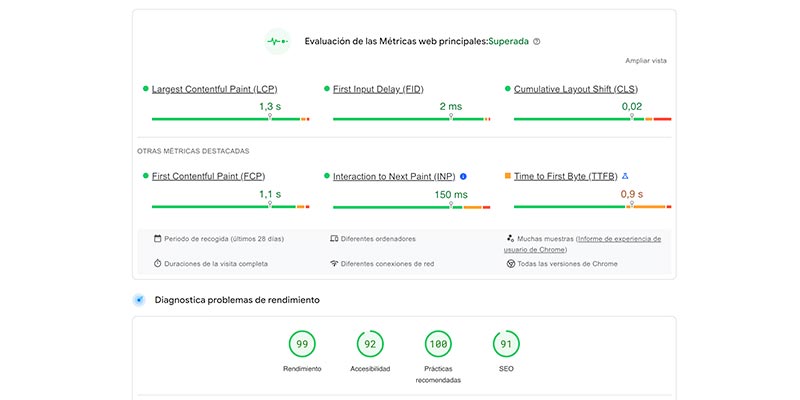
PageSpeed Insights is a Google tool that analyzes the loading speed of your website on both mobile devices and desktop computers. Provides a score that indicates the performance of your page and gives you specific recommendations to improve it. It is a free and easy-to-use tool that will help you optimize your website.
Why is the loading speed of your website important?
The loading speed of your website is essential for several reasons. First of all, it affects the user experience. Visitors expect pages to load quickly and if your website is slow, they are likely to leave before it fully loads. This can result in a loss of leads and sales.
Additionally, loading speed is also important for search engines like Google. Search engines take loading speed into account when determining your website's position in search results. A slow website can negatively affect the positioning of your page.
Tips to improve the speed of your website
There are several improvements you can implement to optimize the loading speed of your page. Below are some tips you can follow:
- Minimize CSS and JavaScript file sizes: Reducing the size of CSS and JavaScript files can help speed up loading time. You can do this by removing whitespace and comments, and combining multiple files into one.
- Use a caching system: Setting up a caching system can help reduce loading time by storing static copies of your page and serving them to visitors. instead of generating them from scratch each time.
- Optimize images: High resolution images can significantly increase your page load time. Make sure you compress them and optimize them for the web.
- Reduce the use of unnecessary plugins and scripts: Every plugin and script you add to your website can slow down its loading speed. Eliminate those that are not necessary.
- Use a reliable hosting service: Choose a reliable and fast hosting service to ensure that your website loads quickly.
Optimizing loading speed in Google PageSpeed Insights
When you analyze your website with PageSpeed Insights, you'll get a score that indicates the quality of your page's performance. It is important to know how to interpret this score so that you can take steps to improve it.
How to interpret the PageSpeed score?
The PageSpeed score is based on a scale of 0 to 100. The higher the score, the better your page will perform. A score above 90 indicates excellent performance, while a score below 50 indicates serious issues affecting loading speed.
Main factors affecting loading speed
There are several factors that can affect the loading speed of your page. Some of the most important are:
- File size: The size of files, such as images, CSS and JavaScript files, can have a significant impact on loading speed.
- Server response delay: If the server does not respond quickly, there may be a delay in the loading time of your page.
Technical improvements to optimize loading speed
In addition to the general tips mentioned above, there are some technical improvements you can make to further optimize your page loading speed. Some of them are:
- Implement GZIP compression: GZIP compression reduces the size of files before they are transferred, which can speed up loading speed.
- Prioritize visible content: Optimize initial loading time by ensuring that the content in the top half of the page loads first.
- Enable browser caching: By enabling browser caching, copies of static files can be stored in the visitor's browser cache, speeding up future visits to your page.
Improve the speed of your website in WordPress
How to optimize loading speed on a WordPress website?
If your website is built with WordPress, there are several specific improvements you can implement to optimize the loading speed of your page:
- Use a light and optimized theme: Heavy themes can slow down the loading speed of your website. Choose a theme that is lightweight and well-optimized for performance.
- Limit the use of plugins: Plugins can have an impact on the loading speed of your page.
- Limit their use to only those that are truly necessary.
- Use a caching system: There are several caching plugins available for WordPress that can help improve loading speed by generating cached copies of your pages.
Plugins y herramientas recomendadas para mejorar la velocidad
Existen algunos plugins y herramientas que pueden ayudarte a mejorar la velocidad de carga de tu web en WordPress. Algunas de las mejores opciones incluyen:
- WP Rocket: Es un popular plugin de caching que puede mejorar significativamente la velocidad de carga de tu página.
- Smush: Este plugin comprime y optimiza automáticamente las imágenes de tu web para reducir el tamaño de los archivos.
- Google Analytics for WordPress: Esta herramienta te permite rastrear y analizar el rendimiento de tu web, lo que puede ayudarte a identificar áreas que necesitan mejorar.
Consideraciones adicionales para mejorar el tiempo de carga
Además de las mejoras técnicas y el uso de plugins, hay algunas consideraciones adicionales que puedes tener en cuenta para mejorar aún más el tiempo de carga de tu página:
- Optimiza el rendimiento de tu servidor web: Asegúrate de que tu servidor web esté configurado correctamente y tenga suficientes recursos para manejar la carga de tu página.
- Minimiza la cantidad de redirecciones: Las redirecciones pueden aumentar el tiempo de carga de tu página. Minimiza su uso y asegúrate de que estén correctamente configuradas.
- Utiliza código limpio y eficiente: El código limpio y eficiente puede acelerar el tiempo de carga de tu página. Asegúrate de escribir código de alta calidad y eliminar cualquier código innecesario.
Mejoras en la velocidad de carga para mejorar la experiencia de usuario
¿Cómo afecta la velocidad de carga a la experiencia de usuario?
La velocidad de carga de tu página web tiene un impacto directo en la experiencia de usuario. Si tu web tarda mucho en cargar, es probable que los visitantes se frustren y abandonen tu página. Por otro lado, si tu web se carga rápidamente, los visitantes estarán más satisfechos y es más probable que se queden y realicen las acciones deseadas, como realizar una compra o completar un formulario.
Consejos para reducir el tiempo de respuesta del servidor
El tiempo de respuesta del servidor es un factor importante que puede afectar a la velocidad de carga de tu página. Aquí tienes algunos consejos para reducir el tiempo de respuesta del servidor:
- Utiliza un servidor de alta calidad: Escoge un servidor web confiable y de alta calidad para asegurarte de que tu página se cargue rápidamente.
- Optimiza tu configuración de servidor: Configura tu servidor de manera que esté optimizado para el rendimiento. Esto incluye ajustar los parámetros de cacheo y minimizar las solicitudes innecesarias.
CSS and JavaScript optimization to improve performance
Optimizing CSS and JavaScript files can have a significant impact on your page performance. Here are some strategies you can follow:
- Minimize and merge files: Reduce the size of CSS and JavaScript files by removing all unnecessary whitespace and comments. Also, consider combining multiple files into one to reduce the number of requests.
- Use asynchronous loading techniques: Use asynchronous loading techniques to load JavaScript files so that they do not block page rendering.
In conclusion, the loading speed of your website is a fundamental factor in providing an excellent user experience and improving your positioning in search engines. Use tools like PageSpeed Insights to evaluate and optimize your website speed, implement technical improvements, and consider specific recommendations for WordPress websites. With these strategies, you can improve your page loading speed and offer an exceptional user experience.